Choosing a Family Safety App: Real-Time Location Sharing Explained
Most families already coordinate their days through their phones. Someone texts "leaving now," someone else asks "are you home yet?", and a parent waits for a reply that doesn't come because a phone is on silent. A family safety app can take some of the guesswork out of those moments without adding pressure to anyone's day.
This guide covers what real-time location sharing actually does, what to look for in a GPS family tracker, and how to introduce one at home so it builds trust. Where it's relevant, we'll show how LifeCircle approaches each point.
What a Family Safety App Should Do
A good family safety app should answer everyday questions quickly. Did my daughter get to school? Is my partner still on the road? Is Grandpa's phone about to die? Ideally you can answer these at a glance, without a string of calls.
Look for these core capabilities:
- A live map showing where each person is and how recently their location updated
- Arrival and departure alerts for places that matter, so you don't have to keep checking
- A way to ask for help quickly when something goes wrong
- Clear privacy controls, including who can see you and how to pause sharing
If an app does these well, extra features are a bonus. If it doesn't, extra features won't make up for it.
How Real-Time Location Sharing Works
Real-time location sharing uses your phone's location services, which combine GPS with other signals such as Wi-Fi and mobile networks, to estimate where you are. The app then shares that position with the people you've chosen.
A few practical points are worth knowing:
- Accuracy varies. Outdoors, location is usually precise. Indoors, underground or in dense city areas, it can drift. Treat the map as a strong guide, not a perfect record.
- Freshness matters. A location from a minute ago is very different from one from two hours ago. Always check when someone last checked in.
- Permissions matter. If location access is restricted or a phone is in a heavy battery-saving mode, updates may be less frequent. Check your phone's settings during setup.
In LifeCircle, every member of your circle appears on a live map with their latest address and how recently they checked in, so you can judge at a glance how current the information is.
What to Look for in a GPS Family Tracker
Not every GPS family tracker suits every household. Before you choose, think through these questions.
Does it fit how your family actually lives?
A household with teenage drivers has different needs from one with a young child or an elderly parent living alone. Speed alerts might matter to one family; battery warnings might matter more to another.
Can you separate different groups?
Your family, your carpool and your weekend hiking friends probably shouldn't all see the same thing. LifeCircle lets you create multiple private circles, such as family, friends, carpool or team, so you control who sees what.
Is it private by default?
Location is sensitive. Look for invite-only groups and the ability to pause sharing or leave a group at any time. In LifeCircle, circles are invite-only via a unique code, and anyone can pause sharing or leave a circle whenever they like.
Does it work for younger children?
If you have kids, check how they connect. LifeCircle offers a dedicated app, LifeCircle: Find My Kid, which children use on their own device. It pairs with a parent's phone using a code, while parents use LifeCircle: Family & Friends.
Setting It Up as a Family
The technology is the easy part. The conversation is what makes it work.
- Explain the why. Frame location sharing as a way to stay connected and help each other, not as surveillance.
- Agree on the basics. Decide together which places to save, such as home, school or work, and when alerts are useful.
- Set expectations for teens. Talk about when pausing is acceptable and when it isn't. Clear rules reduce friction later.
- Show everyone the SOS feature. Make sure each person knows how to use it before they ever need it.
- Revisit it. As children grow, their need for independence grows too. Adjust settings together.
Features That Help Day to Day
When comparing a family safety app and LifeCircle's feature set, these are the tools families tend to use most:
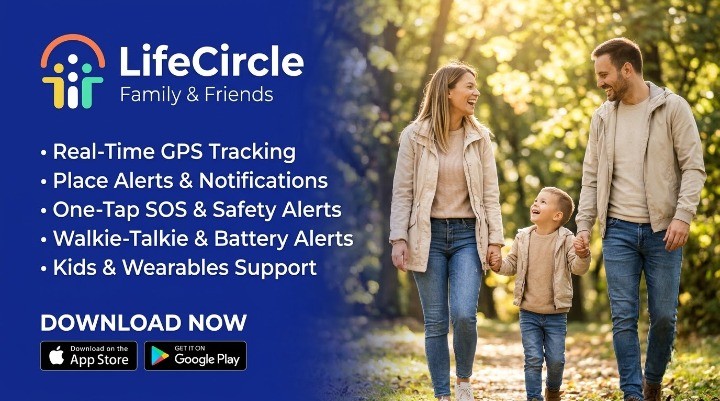
- Place alerts: Get notified the moment someone arrives at or leaves a saved place.
- One-tap SOS: Signal for help without saying a word. Your circle instantly gets your location and an emergency alert.
- Location history: Retrace routes taken today or earlier in the week, stop by stop.
- Speed and driving alerts: Know when a family member exceeds a speed limit, so you can talk about safer driving.
- Battery status: Get warned when a loved one's phone is running low, before they go dark.
- Circle chat: Message your whole circle in one private space, right next to the map.
One important note: an SOS alert to your circle is not a replacement for emergency services. In an emergency, always contact your local emergency number first.
You can see the full list on our features page.
Choosing the Right Plan
LifeCircle offers three memberships. Silver covers smaller groups with live tracking, two days of history, and speed and battery alerts. Gold adds more circles and members, seven days of history, Find My Kid for one child, walkie-talkie (PTT), offline alerts and an ad-free experience. Platinum offers unlimited circles, members and place alerts, 14 days of history, Find My Kid for up to 10 children, and parent and kid smartwatch support.
Compare them on our plans section to see which suits your household.
Using Location Sharing Respectfully
The best results come from treating location data with care:
- Check the map when you have a reason, not constantly.
- Ask before assuming. A location that looks wrong may simply be out of date.
- Use history to help, such as finding a lost item's last stop, rather than to question every move.
- Respect pauses when you've agreed they're reasonable.
Trust is the real safety feature. Technology supports it; it doesn't replace it.
Getting Started
If you're ready to try real-time location sharing with the people who matter most, setup takes just a few minutes. Our help center walks through each step.
When you're ready, you can download LifeCircle here.